Mega-Prompts Explained: How to Write Complex AI Instructions
Learn when long, detailed prompts actually help — and how to build one yourself with a step-by-step framework and ready-to-use templates.
You've seen them online — those 500-word prompts people share in Twitter threads and Reddit posts, promising to turn ChatGPT into a "marketing genius" or "business strategist." They look impressive. They also look exhausting to write.
So you copy-paste one, swap in your details, and... it actually works better than your usual two-sentence prompts. The output is more specific, more structured, more useful. Now you're wondering: is this how I should be prompting all the time?
Not exactly. These long, structured prompts — often called mega-prompts — are powerful tools, but they're not always the right tool. This guide explains what mega-prompts actually are, when they're worth the effort, and how to build one yourself when the situation calls for it.
What Is a Mega-Prompt?
A mega-prompt is a detailed, structured set of instructions — typically 300 to 800 words — that combines multiple prompting elements into a single, comprehensive request. Think of it as giving the AI a complete project brief instead of a quick question.
Where a simple prompt might say "Write a marketing email," a mega-prompt specifies the role the AI should play, the context it needs to know, the exact task to complete, the steps to follow, the rules to obey, and the format to use. It front-loads all the information an AI would normally need multiple back-and-forth exchanges to gather.
Here's the difference in practice:
Simple prompt:
Write a product description for my new fitness app.
Mega-prompt:
You are a conversion-focused copywriter who specializes in health and fitness apps.

Task: Write a product description for a fitness app called FitTrack.

Context:
- Target audience: Busy professionals aged 30-45 who want to exercise but struggle with consistency
- Key features: 15-minute workouts, no equipment needed, progress tracking, reminder system
- Tone: Motivating but not preachy, acknowledges real-life constraints
- Competitors emphasize intensity; we emphasize sustainability

Requirements:
- Open with the reader's pain point, not the product name
- Include 3 bullet points highlighting key benefits (not features)
- End with a low-pressure call to action
- Keep it under 150 words
- Avoid fitness clichés like "transform your body" or "unleash your potential"
The simple prompt leaves the AI guessing about audience, tone, length, and focus. The mega-prompt eliminates guesswork entirely. According to research on prompt length and AI output quality, the optimal range for complex tasks typically falls between 150 and 300 words — though some tasks benefit from even longer instructions.
The 6 Building Blocks of a Mega-Prompt
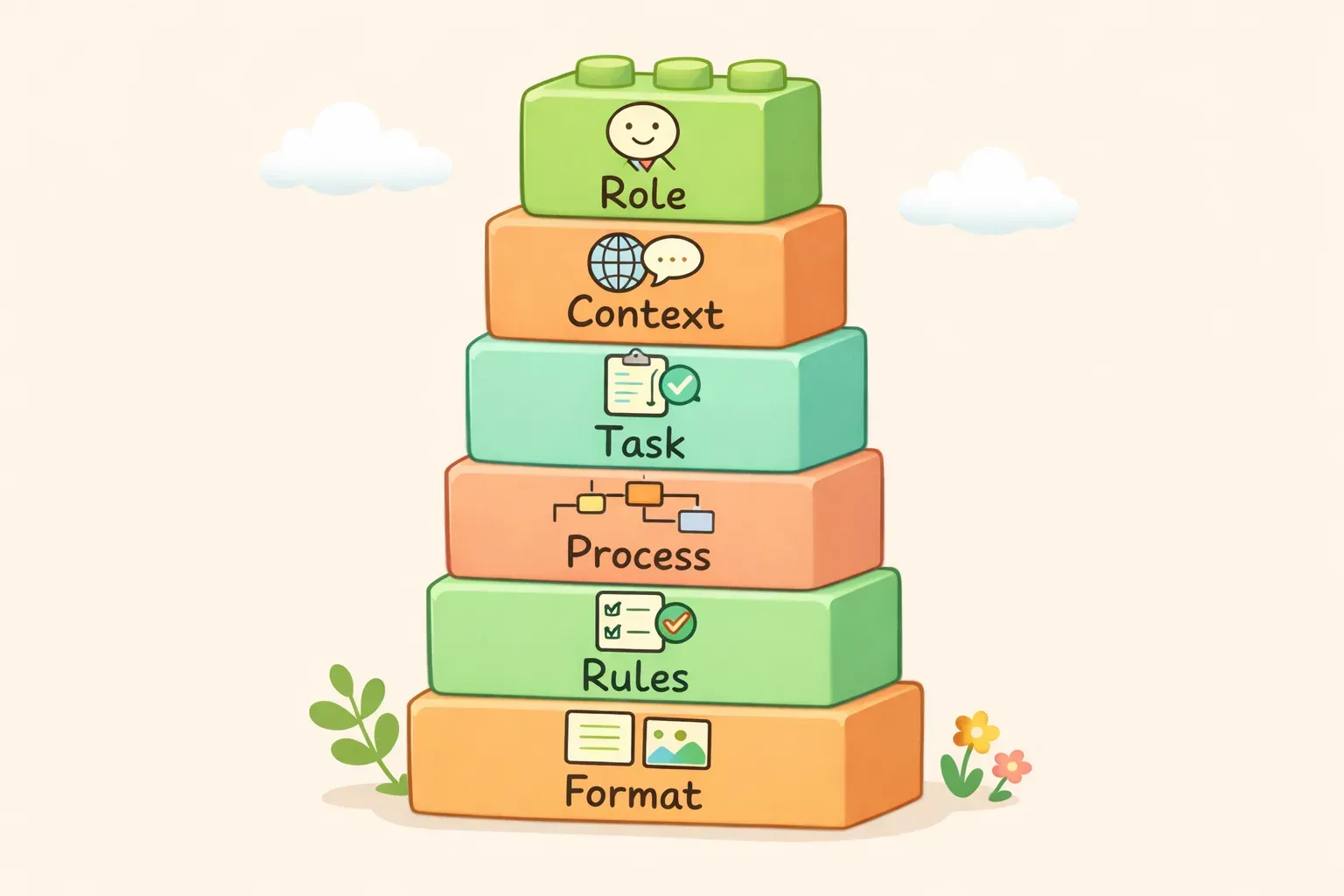
Every effective mega-prompt combines some or all of these six elements. You don't always need all six, but knowing what they are helps you build prompts systematically instead of guessing what to include.
Six building blocks of a mega-prompt: Role, Context, Task, Process, Rules, and Format
1. Role or Persona
Tell the AI who to be. This shapes the expertise level, vocabulary, and perspective of the response.
"You are a senior financial analyst..."
"Act as an experienced UX researcher..."
"You are a patient teacher explaining this to a complete beginner..."
2. Context or Background
Provide the information the AI doesn't have — your specific situation, audience, constraints, or goals. The more relevant context you include, the more tailored the output.
Who is this for?
What's the situation or backstory?
What's already been tried?
What are the constraints (budget, timeline, tone)?
3. Task or Objective
State exactly what you want the AI to produce. Be specific about the deliverable.
"Create a 4-week content calendar..."
"Write 5 email subject line options..."
"Analyze these three options and recommend one..."
4. Process or Steps
For complex tasks, specify the reasoning process or sequence of steps you want the AI to follow. This is especially useful when you need the AI to think through something systematically rather than jumping to a conclusion.
"First, identify the key factors. Then evaluate each option against those factors. Finally, recommend..."
"Work through this step by step..."
5. Constraints or Rules
Set boundaries on what the AI should and shouldn't do. This prevents common failure modes and keeps the output focused.
"Do not use jargon or technical terms"
"Avoid clichés like 'innovative' or 'cutting-edge'"
"Do not make assumptions about data I haven't provided"
"If you're uncertain, say so rather than guessing"
6. Output Format
Specify exactly how you want the response structured — length, format, sections, or style.
"Keep it under 200 words"
"Format as a numbered list with 5 items"
"Structure the response as: Summary, Analysis, Recommendation"
"Use bullet points, not paragraphs"
If you're familiar with basic prompt engineering, you'll recognize some of these elements. A mega-prompt simply stacks them together into a single, comprehensive instruction set.
When Mega-Prompts Are Worth the Effort
Mega-prompts take time to write. That investment pays off in specific situations — but not all of them.
Use a mega-prompt when:
The task is complex with multiple requirements. If you'd normally need 3-4 back-and-forth exchanges to clarify what you want, front-load it all in one prompt.
- You need consistent output across multiple uses. A mega-prompt acts like a template — once it works, you can reuse it with different inputs and get predictable results.
The task requires domain expertise. Complex business analysis, technical writing, or specialized content benefits from detailed role-setting and context.
- Errors are costly. When you can't afford to iterate through several bad outputs (tight deadline, client work, important document), investing upfront in a detailed prompt saves time overall.
You're replacing a multi-step workflow. Instead of prompting for research, then strategy, then execution steps separately, a mega-prompt can handle the entire sequence.
When Mega-Prompts Are Overkill
More detail isn't always better. Research on prompt length suggests that beyond a certain threshold, additional context becomes noise rather than signal. One study found structured short prompts reduced API costs by 76% while maintaining the same output quality.
Skip the mega-prompt when:
You're exploring or brainstorming. Creative tasks often benefit from ambiguity — let the AI surprise you. A mega-prompt over-constrains the output.
- The task is simple and one-off. "Summarize this article" or "Fix the grammar in this paragraph" doesn't need 300 words of instructions.
You're not sure what you want yet. If you're still figuring out your requirements, a mega-prompt locks you into premature decisions. Start with a simple prompt, see what comes back, then refine.
- Iteration is faster than specification. Sometimes it's quicker to prompt, review, and say "make it shorter" than to specify every detail upfront.
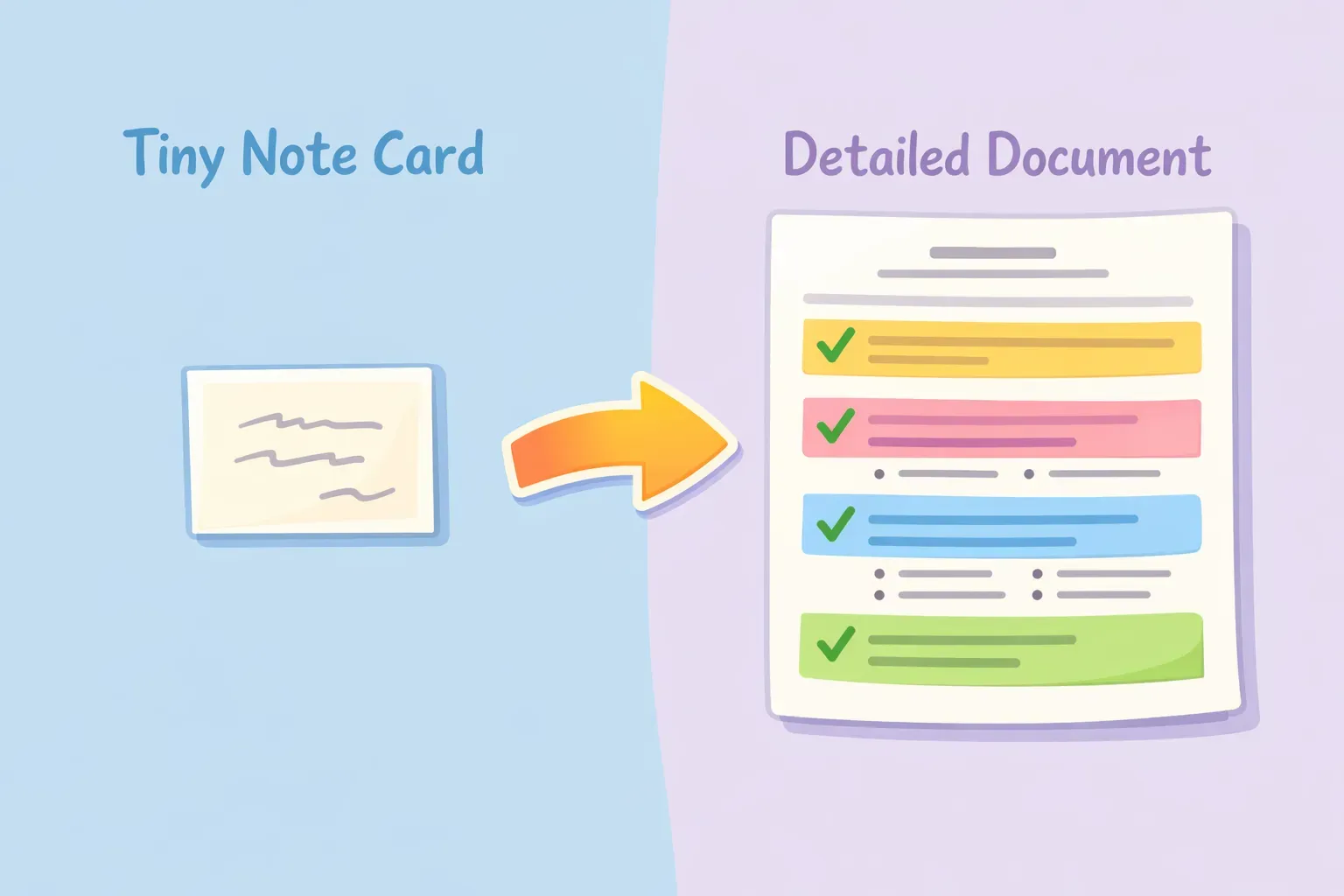
Comparison showing when to use simple prompts versus mega-prompts
How to Build a Mega-Prompt From Scratch
Let's walk through building a mega-prompt step by step. The example: you need the AI to create a content brief for a blog post.
Step 1: Start With the Task
Write the core request first. What's the actual deliverable?
Create a content brief for a blog post about {{topic}}.
Step 2: Add the Role
Who should the AI be to do this task well?
You are a content strategist who specializes in SEO-driven blog content for B2B SaaS companies.
Step 3: Layer in Context
What does the AI need to know about your specific situation?
Context:
- Our blog targets marketing managers at mid-sized companies
- We prioritize actionable advice over thought leadership
- Posts typically rank for long-tail keywords with 500-2000 monthly searches
- Our brand voice is conversational and practical, never salesy
Step 4: Specify the Process
If order matters, spell out the steps:
Process:
1. Identify the primary keyword and 3-5 secondary keywords
2. Analyze what the top-ranking articles cover
3. Find the content gap — what's missing or outdated
4. Outline 6-8 H2 sections that address the gap
5. Suggest a hook angle for the introduction
Step 5: Set Constraints
Add rules to prevent common problems:
Rules:
- Do not suggest generic sections like "What is X" unless truly necessary
- Avoid recommending topics we can't credibly write about (e.g., technical implementation)
- If you're unsure about search volume estimates, say so
Step 6: Define the Output Format
Specify exactly how you want the deliverable structured:
Format your response as:
- Working title (under 60 characters, includes primary keyword)
- Primary keyword + search intent
- Secondary keywords (3-5)
- Target word count
- Outline with H2 sections and 1-sentence description of each
- Hook angle for the intro (1-2 sentences)
- Key differentiator vs. competing articles
The Complete Mega-Prompt
Here's what it looks like assembled:
You are a content strategist who specializes in SEO-driven blog content for B2B SaaS companies.

Task: Create a content brief for a blog post about {{topic}}.

Context:
- Our blog targets marketing managers at mid-sized companies
- We prioritize actionable advice over thought leadership
- Posts typically rank for long-tail keywords with 500-2000 monthly searches
- Our brand voice is conversational and practical, never salesy

Process:
1. Identify the primary keyword and 3-5 secondary keywords
2. Analyze what the top-ranking articles cover
3. Find the content gap — what's missing or outdated
4. Outline 6-8 H2 sections that address the gap
5. Suggest a hook angle for the introduction

Rules:
- Do not suggest generic sections like "What is X" unless truly necessary
- Avoid recommending topics we can't credibly write about
- If you're unsure about search volume estimates, say so

Format:
- Working title (under 60 characters, includes primary keyword)
- Primary keyword + search intent
- Secondary keywords (3-5)
- Target word count
- Outline with H2 sections and 1-sentence description of each
- Hook angle for the intro (1-2 sentences)
- Key differentiator vs. competing articles
This prompt is about 250 words. It takes a few minutes to write the first time — but once it exists, you can reuse it for every blog post by swapping in a different {{topic}}.
3 Ready-to-Use Mega-Prompt Templates
Here are three mega-prompts you can copy and customize. Each uses {{variables}} for the parts you'll change each time.
1. Business Decision Analysis
You are a business strategist helping a founder think through an important decision.

Decision: {{decision_description}}

Context:
{{relevant_background}}

Analyze this decision by:
1. Identifying the 4-5 most important factors to consider
2. Evaluating how each option performs on these factors
3. Noting the key risks and tradeoffs for each path
4. Considering what would need to be true for each option to be the right choice
5. Making a recommendation with clear reasoning

Rules:
- Be direct about tradeoffs — don't hedge everything
- If I haven't provided enough information for a confident recommendation, tell me what's missing
- Avoid generic business advice — be specific to my situation

Format:
- Key factors (bulleted list with 1-sentence explanation of why each matters)
- Option analysis (evaluate each option against the factors)
- Recommendation (1 paragraph with clear reasoning)
- What to watch for (2-3 signals that would change the recommendation)
2. Meeting Notes to Action Items
You are an executive assistant who excels at extracting clear action items from messy meeting notes.

Meeting notes:
{{meeting_notes}}

Task: Transform these notes into a structured summary with clear next steps.

Process:
1. Identify the main topics discussed
2. Extract every decision that was made
3. Pull out all action items, assigning owners where mentioned
4. Note any open questions that weren't resolved
5. Flag any deadlines or time-sensitive items

Rules:
- If an owner isn't clear from context, mark it as "Owner: TBD"
- Don't add action items that weren't actually discussed
- Keep each item to one sentence
- Use the exact names/terms from the notes

Format:
## Summary
(2-3 sentences on what the meeting was about)

## Decisions Made
(bulleted list)

## Action Items
(bulleted list with owner and deadline if mentioned)

## Open Questions
(bulleted list)

## Next Meeting
(if mentioned)
3. Competitor Analysis Brief
You are a competitive intelligence analyst.

Task: Create a competitive analysis comparing {{my_product}} to {{competitor_products}}.

Context:
- My product: {{my_product_description}}
- Target customer: {{target_customer}}
- Key differentiator we want to emphasize: {{differentiator}}

Analysis process:
1. Identify 5-7 factors customers care about when choosing between these options
2. Rate each product on each factor (Strong / Adequate / Weak)
3. Identify where we win, where we lose, and where it's a tie
4. Note any gaps in my knowledge that would require further research

Rules:
- Be honest about where competitors are stronger — I need accurate intel, not cheerleading
- Base assessments on publicly available information only
- If you don't have reliable information about a competitor's capability, say so

Format:
- Comparison table (factors as rows, products as columns)
- Where we win (2-3 bullets with specific reasons)
- Where we need to improve (2-3 bullets)
- Messaging recommendations (how to position against each competitor)
- Research gaps (what I should verify before using this analysis)
If you find yourself reusing prompts like these — swapping in different decisions, meeting notes, or competitors each time — a tool like PromptNest lets you save them with the {{variables}} built in. Fill in the blanks when you need it, and the final prompt is ready to paste.
Common Mistakes That Break Mega-Prompts
Longer prompts create more opportunities for things to go wrong. Watch out for these common problems:
Contradictory instructions. "Be concise" and "Include detailed examples for every point" pull in opposite directions. The AI will either ignore one instruction or produce confused output. Read through your prompt and check for conflicts.
Too many competing priorities. If everything is important, nothing is. A mega-prompt with 15 requirements often produces worse output than one with 5 clear priorities. Rank what matters most.
Missing the "why." Rules without context get ignored or misapplied. "Don't use jargon" is better when you add "because the audience is non-technical." The AI can then make judgment calls on edge cases.
No examples of what "good" looks like. For tasks requiring a specific style or format, showing one example is worth 100 words of description. Include a sample of the output you want when possible.
Skipping the test run. A mega-prompt that looks good on paper might produce garbage in practice. Always test with real inputs before relying on it. Iterate on the parts that don't work.
Saving and Reusing Your Mega-Prompts
Here's the practical problem with mega-prompts: they're too long to remember and tedious to retype. The first time you craft a good one, it feels like a breakthrough. The fifth time you try to reconstruct it from memory, it feels like a chore.
The people who get real value from mega-prompts don't rewrite them every time. They save them somewhere — a document, a note, a dedicated tool — with variables marking the parts that change. When they need it, they fill in the blanks and paste.
You can use whatever system works for you: a Google Doc, a Notion database, even a folder of text files. The key is having a system at all.
If you want something purpose-built, PromptNest is a native Mac app, $19.99 one-time on the Mac App Store — no subscription, no account, runs locally. You save prompts with variables like {{client_name}} or {{topic}}, organize them by project, and access them with a keyboard shortcut from any app. When you need a mega-prompt, you search for it, fill in the variables, and the complete prompt copies to your clipboard — ready to paste into ChatGPT, Claude, or wherever you're working.
Start Simple, Scale Up
Mega-prompts aren't better than simple prompts — they're different tools for different jobs. A screwdriver isn't better than a hammer; it depends on whether you're dealing with screws or nails.
Start with simple prompts. When you hit a wall — the output is too generic, too inconsistent, or requires too much back-and-forth — that's when you add structure. Build up the building blocks one at a time: add a role, layer in context, specify the format. You'll develop intuition for how much detail each type of task needs.
And when you build a mega-prompt that works well, save it. Your future self will thank you.