Learn the five building blocks of effective prompts — with copy-paste examples you can use right now with ChatGPT, Claude, or any AI assistant.
You typed a perfectly reasonable question into ChatGPT. The response? A wall of generic fluff that completely missed the point. So you tried again. And again. Twenty minutes later, you're still wrestling with an AI that seems determined to misunderstand you.
Sound familiar? You're not alone. Most people using AI assistants hit this wall — not because the AI is broken, but because nobody taught them how to ask.
The difference between a frustrating AI experience and a useful one often comes down to how you write your prompts. According to research from Great Learning, vague prompts are the single most common mistake beginners make. And the fix isn't complicated — it just requires knowing what the AI actually needs from you.
This guide breaks down prompt writing into five simple building blocks. No jargon, no theory — just practical techniques you can use immediately.
Why Your Prompts Aren't Working
Here's the uncomfortable truth: AI assistants aren't mind readers. When you type "write me an email," you know exactly what you mean — the recipient, the context, the tone you want. The AI knows none of that. It's guessing. And its guesses are usually wrong.
Think about it this way: if you asked a new coworker to "write an email," they'd immediately ask follow-up questions. Who's it for? What's the purpose? How formal should it be? AI can't ask those questions, so it fills in the blanks with generic assumptions.
The solution isn't to write longer prompts or use fancy techniques. It's to give the AI the same information you'd give that coworker. Let's look at how.
The Five Building Blocks of an Effective Prompt
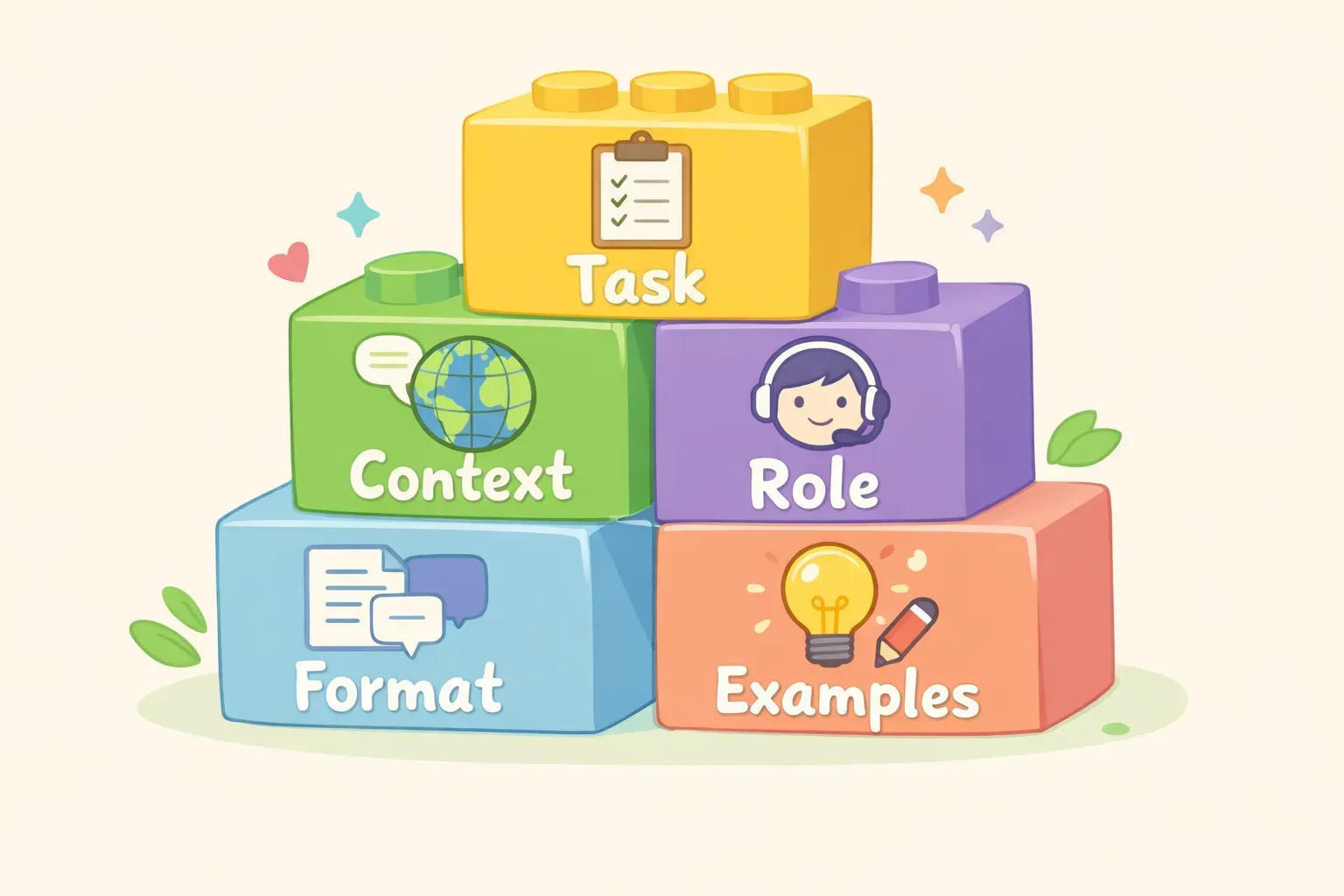
Every good prompt contains some combination of these five elements:
Task — What do you want the AI to do?
Context — What background information does it need?
Role — What perspective should it take?
Format — How should the output look?
Examples — What does "good" look like?
You don't need all five for every prompt. A simple question might only need the task. But when you're getting bad results, one of these is usually missing.
The five building blocks of effective prompts: task, context, role, format, and examples
Building Block 1: Be Specific About the Task
Vague tasks get vague results. Compare these two prompts:
Vague: "Write about marketing."
Specific: "Write three social media post ideas for a coffee shop announcing a new seasonal drink."
The second prompt tells the AI exactly what to produce (three post ideas), for whom (a coffee shop), and about what (a new seasonal drink). No guessing required.
Here's a template you can steal:
Write [specific output type] about [specific topic] for [specific audience/purpose].
Some examples:
"Write a 200-word product description for a waterproof hiking backpack aimed at casual day hikers."
"Create five subject line options for an email about our upcoming webinar on remote team management."
"Draft a polite response declining a meeting request due to schedule conflicts."
Building Block 2: Give Context the AI Doesn't Have
AI models are trained on general internet data. They don't know about your company, your project, or your specific situation. If that context matters — and it usually does — you need to provide it.
Without context: "Help me respond to this customer complaint."
With context: "Help me respond to a customer complaint. Context: We're a small online plant shop. The customer's monstera arrived with damaged leaves due to cold weather during shipping. Our policy offers free replacements for shipping damage. We want to keep the response warm and apologetic while offering the replacement."
The more relevant context you provide, the more tailored the response. Think about:
Who is the audience?
What's the situation or background?
What constraints exist (word count, tone, format)?
What's already been tried or said?
One useful trick: paste in relevant documents, previous emails, or reference material directly into your prompt. AI can work with that context to give you something much more useful than a generic answer.
Building Block 3: Assign a Role
Telling the AI to "act as" a specific role changes how it approaches your request. According to PromptLayer's research, role prompting helps the AI adopt a specific perspective, expertise level, and communication style.
Here's the difference in action:
Without role: "Explain mutual funds."
With role: "You are a financial advisor explaining mutual funds to a first-time investor who has no finance background. Keep it simple and avoid jargon."
Useful roles to try:
"You are an experienced copywriter who specializes in email marketing."
"Act as a senior software developer reviewing code for a junior teammate."
"You are a patient teacher explaining this concept to a complete beginner."
"Respond as a skeptical customer who needs convincing."
One caveat: role prompting is less powerful in newer models than it was in earlier versions of ChatGPT. But it still helps set the tone and expertise level, especially when combined with specific context.
Building Block 4: Specify the Output Format
AI defaults to paragraphs of prose. If you want something different — a list, a table, bullet points, a specific length — you need to ask for it.
Default output: "Give me feedback on my resume."
Formatted output: "Review my resume and provide feedback as:
- 3 strengths (one sentence each)
- 3 areas to improve (one sentence each)
- 1 specific suggestion for my summary section"
Format options to consider:
Length: "Keep it under 100 words" or "Write a detailed 500-word response"
Structure: "Use bullet points" or "Format as a numbered list" or "Create a table"
Tone: "Keep it casual and friendly" or "Use a professional, formal tone"
Style: "Write in short, punchy sentences" or "Include specific examples"
Here's a prompt that uses format specifications well:
I'm preparing for a job interview at a tech startup. Give me:

1. Five common interview questions for a marketing manager role
2. For each question, a brief (2-3 sentence) suggested answer approach
3. Two questions I should ask the interviewer

Keep the tone conversational but professional.
Building Block 5: Show Examples When Possible
Sometimes the easiest way to get what you want is to show the AI an example. This technique — called "few-shot prompting" in technical terms — works especially well when you need a specific style or format that's hard to describe.
Without example: "Write a product tagline for our new running shoe."
With example: "Write a product tagline for our new running shoe. Here are taglines we've used before that match our brand voice:
- 'Built for the long haul.'
- 'Every mile, earned.'
- 'Your feet will thank you.'
Create 5 new options in this same style."
Examples work great for:
Matching a specific writing style or brand voice
Getting consistent formatting across multiple outputs
Showing the level of detail you want
Clarifying what "good" looks like when it's hard to explain
You can even show examples of what you don't want: "Avoid generic phrases like 'innovative solutions' or 'best-in-class' — here are examples of the clichés to skip..."
Putting It All Together
Let's build a complete prompt using all five building blocks. Say you need help writing a project update email.
Basic prompt: "Write a project update email."
Better prompt using all five blocks:
You are a project manager who communicates clearly and concisely. (Role)

Write a project update email for our website redesign project. (Task)

Context: We're two weeks into a six-week project. The design phase is complete and on schedule. Development starts Monday. One risk: the lead developer is out sick, which might delay the first sprint by 2-3 days. The audience is the executive team who want high-level updates, not technical details.

Format the email as:
- Subject line
- 2-3 sentence summary
- Three bullet points for key updates
- One sentence on next steps

Keep the tone professional but not stiff. Here's an example of our communication style: "We're making solid progress and staying ahead of any bumps in the road." (Example)
This prompt takes longer to write, but the output will be dramatically better — and you'll spend less time editing or regenerating.
Before and after comparison showing a vague prompt versus a detailed prompt with all five building blocks
If you find yourself reusing prompts like this — swapping out project names, audiences, or contexts each time — consider saving them as templates. Tools like PromptNest let you store prompts with variables like {{project_name}} or {{audience}}, so you can fill in the blanks and copy a ready-to-use prompt in seconds.
Quick Fixes for Common Problems
Here are the most common prompt problems and how to fix them:
Problem: Response is too generic.
Fix: Add specific context about your situation, audience, or constraints.
Problem: Response is too long or too short.
Fix: Specify the length: "Keep it under 150 words" or "Write at least 500 words with detailed examples."
Problem: Tone is off.
Fix: Assign a role and describe the tone: "Write in a warm, conversational tone like you're explaining to a friend."
Problem: AI misunderstood what you wanted.
Fix: Show an example of what "good" looks like, or explicitly state what to avoid: "Don't include technical jargon" or "Skip the introduction — start with the main point."
Problem: The first response isn't quite right.
Fix: Don't start over. Reply with feedback: "Good start, but make it more concise" or "Focus more on the customer benefit, less on features." AI works best as a conversation, not a slot machine.
What to Do with Prompts That Work
Once you've crafted a prompt that gets great results, don't let it disappear into your chat history. That's where most people's best prompts go to die — buried under hundreds of other conversations, impossible to find when you need them again.
The people who get the most value from AI assistants aren't necessarily better at writing prompts. They're better at saving and reusing the prompts that work. They build a personal library over time, organized by task or project, ready to grab when they need it.
You can start simple — a note in your phone, a Google Doc, whatever works. The key is having a system.
If you want something purpose-built for this, PromptNest is a native Mac app designed specifically for organizing prompts. You can group prompts by project, search across your whole collection, and use variables like {{client_name}} so you're not rewriting the same prompt for different situations. It's $19.99 one-time on the Mac App Store — no subscription, no account, runs locally.
Start Here
You don't need to memorize frameworks or study prompt engineering courses. Just remember the five building blocks — task, context, role, format, examples — and add them when your prompts aren't working.
Start with one prompt you use regularly. Maybe it's asking AI to help draft emails, summarize notes, or brainstorm ideas. Rewrite it using the building blocks. Compare the results.